
Your subscription pause policy should suspend billing and deliveries for a fixed, preset window (think one, two, or three months) and auto-resume on a set date with no action required. Default guardrails matter: cap pauses per year, require one completed billing cycle before eligibility, and keep the whole thing self-service. A pre-resume reminder closes the loop so nobody gets surprised by a charge.
TL;DR:
- Offering preset pause durations of one to three months with automatic resumption improves reactivation rates and reduces the risk of indefinite dormancy.
- Clear communication stating that charges, deliveries, and perks pause, while loyalty points freeze, prevents customer confusion and support issues.
- Systems should automatically recalculate renewal dates and handle failed payments during resume, avoiding silent cancellations or missed charges.
- Addressing pause options visibly on account dashboards, in billing emails, and at cancellation helps encourage usage and preserves customer relationships.
- Automating reminders and support flexibility during a pause fosters trust, improves retention, and minimizes disputes or negative feedback.
Table of Contents
- What Does a Subscription Pause Policy Actually Cover?
- How Long Should a Subscription Freeze Last?
- Setting Up Pause in Your Billing and Fulfillment Systems
- Where Customers Should See the Pause Option
- Copy-Ready Templates for Pause Confirmation and Reminders
- What Support Should Do for Paused Customers
- Does Pausing Affect Renewal Dates or Contract Terms?
- Are There Legal Requirements for Subscription Pause Policies?
- An Operator's Take on Pause, Not Just a Policy Writer's
- Run Your Pause Policy Without the Manual Admin
- Sources
- FAQ
What Does a Subscription Pause Policy Actually Cover?
A pause is not a discount and it is not a cancellation. It is a scheduled interruption, and every vendor needs to spell out exactly what stops and what keeps running.
Get specific here, because vague language is what generates support tickets three weeks later. Your policy needs to answer four questions in plain terms:
- Billing: Charges stop entirely during the pause window. No prorated mini-charges, no "administrative fee" to hold the slot.
- Fulfillment: Deliveries or meal-prep pickups stop for every cycle inside the pause window, full stop.
- Perks and pricing: State whether a paused customer keeps their locked-in price when they resume, or whether they resume at current pricing. Most food subscription operators lock the price, since that is the retention lever that made the customer stay in the first place.
- Loyalty benefits: Decide if points, streaks, or tier status freeze (recommended) or reset. A reset feels punitive and pushes borderline customers straight into cancellation.
Payment methods should stay on file through the pause. Do not force customers to re-enter a card to pause, that friction alone will push them toward canceling. Do require revalidation only if the card is expired or flagged at resume time, which you will catch automatically if your billing tool checks card status before the first post-pause charge.
How Long Should a Subscription Freeze Last?
Preset durations beat open-ended ones, and the data backs this up hard. Shorter pauses reactivate at meaningfully higher rates than long ones, with one-month pauses outperforming three-month pauses on reactivation once the freeze ends. Open-ended pauses, meanwhile, tend to quietly become cancellations, since nothing ever forces a decision.
Here is a gating structure that works for most meal-prep and catering subscriptions:
- Offer three presets: 1 month, 2 months, 3 months, each with an automatic resume date.
- Allow a custom pause date beyond three months only up to a 6 to 12 month ceiling, and route anything longer than that through manual review.
- Cap total pause usage to a small number of pauses per year, so the option stays a break, not a permanent discount.
- Require at least one completed, paid billing cycle before a customer becomes pause-eligible, which helps block signup-then-immediate-pause abuse.
- Trigger a re-verification step (card and delivery address) automatically on any resume happening more than eight weeks after the pause started.
Best-practice guidance on flexibility features points to the same pattern: fixed-duration, auto-resuming pauses in the four-to-twelve-week range with a reminder before the charge hits, rather than indefinite freezes that quietly go dormant.
Pro Tip: If a customer requests a pause longer than your standard ceiling, offer the maximum preset plus a note that they can pause again once it ends. Two shorter pauses beat one long one for reactivation, and your policy stays clean.
Setting Up Pause in Your Billing and Fulfillment Systems
The policy only works if your systems actually enforce it. Engineering and ops need a checklist, not a paragraph of intentions.

On the billing side, suspend charges for the full paused interval and recalculate the next billing date the moment resume triggers, so nobody gets hit with a surprise charge stacked on top of a normal cycle. On the fulfillment side, pause needs to skip every scheduled shipment or prep batch inside that window without leaving a gap in your production forecast, something worth cross-checking against your recurring order workflow if you run a weekly prep schedule.
Expired cards and failed reactivation charges need a clear fallback path, not a dead end:
- On resume, attempt the charge and retry using your standard failed-payment schedule (typically two to three attempts over several days).
- If every retry fails, notify the customer by email and SMS, and hold the resume rather than silently canceling.
- After a defined number of failed attempts (most vendors use three), convert the account to canceled status and send a clear final notice.
- Log every event: pause start, pause extension, resume, and resume failure, so you can audit patterns later.
Before launch, confirm your billing provider actually supports subscription pausing natively, check how pause dates behave across time zones if you serve multiple regions, and build a guard against duplicate pause requests on the same account.
Where Customers Should See the Pause Option
Discoverability decides whether pause gets used at all. Bury it in a settings menu three clicks deep, and customers will cancel instead simply because canceling is the button they can find.
Put pause in three places specifically. First, next to the "next shipment" or "next charge" line in the account dashboard, since that is where customers already look when they are thinking about their subscription. Second, inside the upcoming-charge email or SMS itself, a day or two before billing runs, so customers who are on the fence see the option at the exact moment it matters. Third, as the first offer in the cancel flow, before the cancel confirmation screen. Presenting pause as a real, helpful alternative rather than a retention trick at the eleventh hour is what makes it feel genuinely useful rather than manipulative.
Notification timing matters as much as placement:
- Send an immediate confirmation the moment pause activates, listing the resume date plainly.
- For pauses over eight weeks, send one mid-pause check-in so the account never feels forgotten.
- Send a pre-resume reminder seven days before the resume date, giving customers a chance to extend, cancel, or do nothing.
- Send a reactivation confirmation once billing and fulfillment resume.
Every pause needs a visible, one-click unpause button. Nothing kills trust faster than a "pause" that feels permanent once activated.
Copy-Ready Templates for Pause Confirmation and Reminders
Good policy language and good lifecycle messaging use the same plain, specific tone. Here is exactly what to send at each stage.
Policy text (terms page): "You can pause your subscription for 1, 2, or 3 months. Billing and deliveries stop during your pause and resume automatically on your selected date. You may pause up to twice per year, and you'll get a reminder before your subscription resumes."
Pause confirmation email: State the resume date, what happens on that date (billing and deliveries restart), and a direct link to manage or extend the pause.
Pre-resume reminder (sent 7 days out): "Your subscription resumes on [date]. Your next order will ship then and your card will be charged [amount]. Need more time? Extend your pause here."
Reactivation confirmation: Confirm the charge amount, the next delivery date, and a support link in case anything looks off.
Cancel-flow save line: "Not ready to cancel? Pause your plan instead, no charges or deliveries until you're ready to come back."
Clear, plain-language lifecycle messaging at each stage is what reduces disputes and confused chargebacks after the fact.
Pro Tip: Keep every pause-related message under 50 words. Customers skim these, and the two facts they actually need are the resume date and the dollar amount that will hit their card.
What Support Should Do for Paused Customers
Paused accounts are not gone accounts, and your support team needs to treat them that way. A customer mid-pause who emails with a question is still a customer, and how you respond shapes whether they resume or quietly let the subscription die.
Set a clear internal rule: paused accounts get the same response time as active ones. Do not deprioritize a support ticket just because billing is suspended. Common requests during a pause include extending the pause, changing the resume date, updating a delivery address before reactivation, or asking whether they can swap their plan tier for when they come back.
Give your support team the ability to extend or shorten a pause directly, without escalation, up to your policy's maximum. Nothing frustrates a paused customer more than being told to "wait until you resume" to make a simple change. If a customer contacts support wanting to cancel entirely while paused, treat that as a normal cancellation request. A pause is not a lock, and forcing someone to wait out a freeze before they can cancel generates resentment that shows up in reviews.
Document every pause-related interaction the same way you document active-account tickets. When you later analyze pause-to-cancel ratios, gaps in your support log will make it impossible to tell whether people paused successfully or gave up trying to get help.
Does Pausing Affect Renewal Dates or Contract Terms?
Pause should shift the renewal clock, not erase it. If a customer pauses for two months mid-cycle, their renewal date (and any annual commitment, if you offer one) pushes back by the length of the pause. That is the fairest structure, and it is also the one customers expect, since they are not paying for time they did not use.
Where this gets tricky is with annual plans or bundled commitments. If a customer prepaid for 12 months and pauses for six weeks, extend their end date by six weeks rather than treating the pause as forfeited time. Publish this rule explicitly in your policy, because ambiguity here is one of the most common sources of billing disputes.
For month-to-month plans without a fixed term, the impact is simpler: pause just delays the next charge by the pause length, and the subscription otherwise continues indefinitely as normal. Either way, never let a pause silently shorten what a customer already paid for. That single mistake does more damage to trust than almost anything else in a subscription relationship, and it is entirely avoidable with one clear sentence in your terms.
Are There Legal Requirements for Subscription Pause Policies?
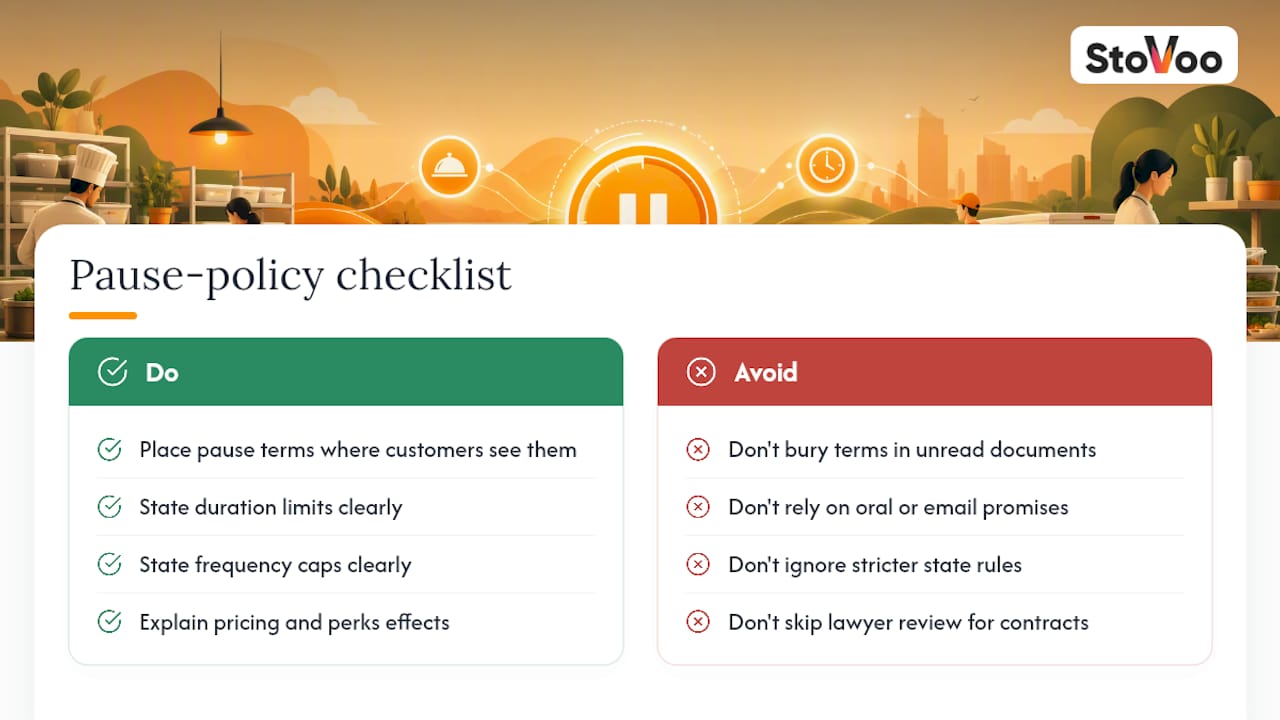
Subscription pause policies intersect with consumer protection rules that govern recurring billing, particularly around clear disclosure and easy cancellation. Many jurisdictions require that if you offer a cancel option, it must be at least as easy to use as sign-up, and increasingly regulators expect the same standard for pause and modification features tied to recurring charges.
The practical takeaway for food subscription vendors: your pause terms need to live somewhere customers can actually find before they subscribe, not buried in a document they never open. State the duration limits, frequency caps, and what happens to pricing and perks clearly in your terms of service. If your business operates across multiple states, check whether any apply stricter recurring-billing disclosure rules, since a few have added specific requirements for subscription cancellation and modification clarity in recent years.
None of this is a substitute for a conversation with a lawyer familiar with your state's consumer protection statutes, especially if you run annual contracts or auto-renewal terms alongside your pause option. But the core principle holds regardless of jurisdiction: a pause policy that is written down, easy to find, and consistently enforced protects you far better than one that exists only in your head or in scattered email replies to confused customers.
An Operator's Take on Pause, Not Just a Policy Writer's
Short, auto-resuming pauses protect the customer relationship better than long, indefinite freezes ever will. A customer who pauses for a month and comes back on schedule stays a customer. A customer who pauses "indefinitely" has usually already left, they just have not clicked cancel yet.
The metric worth watching isn't pause volume, it's your pause-to-cancel ratio and reactivation rate broken out by pause length. If your one-month pauses reactivate at twice the rate of your three-month pauses, that is your policy telling you exactly where to set the defaults.
— freeman
Run Your Pause Policy Without the Manual Admin
Building the guardrails above by hand, tracking resume dates in a spreadsheet, remembering to send reminder emails, is exactly the kind of task that eats a weekend and still leaves gaps. Stovoo puts native pause controls directly on your shopfront, so customers set their own resume date, get automatic confirmation and reminder messages, and reactivate without you touching a single invoice.

The dashboard shows every paused customer alongside their resume date, so you can spot a customer whose pause is about to end and reach out personally if you want to. Billing pauses and resumes automatically through the platform, matching the guardrails in this policy, one to three month presets, frequency caps, and pre-resume reminders, without you writing a line of code or manually adjusting invoices. You can see how a real subscription shopfront presents these options on a live storefront like ami's shopfront, and if you're weighing pause against other retention options like delivery cadence changes, the meal subscription ideas guide is worth a look too.
Ready to put this policy into practice without building it from scratch? Create your Stovoo account and set up your pause rules on your shopfront today.
Sources
The pause duration and frequency recommendations above draw on real retention data, not guesswork. Here's where the numbers come from.
- Subscription “Pause” Policy Guide - Implement a subscription pause option instead of outright cancellation
- Pause, Skip, Swap Subscriptions: The Three Flexibility Actions That Save Churn (2026) | SimpleSubscription
- Adyen: subscription churn knowledge hub
FAQ
Who is eligible to pause a meal subscription?
Most food subscription vendors require at least one completed, paid billing cycle before a customer can pause, which prevents signup-then-immediate-pause abuse.
What happens to billing when a subscription resumes?
Charges resume automatically on the customer's selected resume date, with the next billing date recalculated to avoid stacking a surprise charge on top of a normal cycle.
What if a customer's card expires during a pause?
The system should attempt standard payment retries at resume, notify the customer if all retries fail, hold the resume rather than canceling immediately, and convert to cancellation only after a set number of failed attempts.
Do loyalty points or locked-in pricing survive a pause?
Most vendors freeze loyalty status and lock-in pricing during a pause rather than resetting them, since resetting perks tends to push borderline customers straight into cancellation.
Can a customer pause instead of canceling on Stovoo?
Yes, Stovoo's shopfront tools let vendors offer native, self-service pause as the first option in the cancel flow, with automatic resume dates and reminder messaging built in.