
Run scheduled pickup windows with enforced cutoffs, per-slot capacity caps, and recurring-order support, then test the setup for one week before you trust it. That combination is the actual system behind every food business that stops fielding "can I still order?" texts an hour before close.
The immediate move: turn on an automated cutoff on your ordering page today and open one test slot to see how it behaves under real orders.
- Enforce a cutoff time so the order window closes itself, no manual policing.
- Cap orders per slot so one pickup window can't swallow your whole prep list.
- Build in recurring pickup support from day one, even if only a few customers use it yet.
Stovoo is built around exactly this job. It handles the cutoffs, the caps, and the recurring orders in one dashboard, so you're not stitching together a form, a spreadsheet, and a group chat to get the same result.
TL;DR:
- Automate cutoff enforcement to prevent manual errors and ensure timely closing of order windows, reducing kitchen stress and late exceptions.
- Set per-slot capacity limits based on real kitchen output and adjust them weekly after reviewing order patterns, not on optimistic guesses.
- Use wide delivery slots of 15 to 20 minutes for quick items and longer lead times, like 24 to 72 hours, for complex or catering orders, tightening only over time.
- Maintain clear, visible cutoff times and confirmation messages to improve customer compliance and reduce late or missed pickups.
- Use a unified system like Stovoo that manages cutoffs, capacity caps, recurring orders, and customer data ownership in a single dashboard to streamline operations.
Table of Contents
- What Is Meal Pickup Scheduling, Exactly?
- Core Principles Behind a Reliable Pickup Schedule
- The Exact Settings You Need to Configure
- Policies That Keep Your Schedule From Falling Apart
- Turning a Schedule Into a Working Kitchen Flow
- Scheduling Recurring Pickups Without Breaking Capacity
- What Your Scheduling Tool Actually Needs to Do
- A One-Week Rollout Plan for Your New Schedule
- Getting the Messaging Around Cutoffs Right
- Matching Your Staffing and Prep Plan to the Schedule
- Connecting Your Schedule to Delivery and Vendor Systems
- Why Real-Time Slot Availability Matters More Than It Seems
- Designing an Interface Customers Actually Want to Use
- Handling Last-Minute Changes Without Losing Your Margin
- Using Pickup Data to Improve Your Schedule Over Time
- Keeping Customer and Order Data Secure
- Why Treating Scheduling as an Operational Promise Changes Everything
- Get Your Pickup Schedule Running on Stovoo
- Key Takeaways
- Sources
- FAQ
What Is Meal Pickup Scheduling, Exactly?
Meal pickup scheduling is the system a food business uses to control when customers order, when they collect, and how many orders land in any single window. It's the vendor-facing layer, not the calendar a customer sees. Done right, it answers three questions before a single order comes in: what are we promising, how much can we handle at once, and what happens when someone wants the same order every week.
Most small food businesses back into this system by accident. They start with a Google Form, add a cutoff time because someone showed up too late once, then bolt on a recurring order tracker in a separate spreadsheet. That patchwork works for a while. It breaks the first time you have a busy Saturday and two staff members are each convinced they have the final order count.
Core Principles Behind a Reliable Pickup Schedule
Before you touch any settings, define what a "slot" actually promises. A ready-by slot means the order will be prepared by that time and the customer can arrive whenever after. An arrival window means the customer must show up in that window or risk losing their order. Confusing the two is the single most common source of pickup complaints, because customers assume one and staff assume the other.
There are three practical models worth knowing:
- Skip-the-line pickup: customer orders same-day for pickup within the hour, ideal for grab-and-go items.
- Same-day scheduled pickup: customer picks a window later that day, giving the kitchen lead time to batch prep.
- Future-date or recurring pickup: customer books ahead, often for meal plans or catering, which needs firmer cutoffs.
Start with generous slot lengths, 15 to 20 minutes for skip-the-line setups, and only tighten granularity once your prep flow is stable for a few weeks.
Pro Tip: Don't launch with 10-minute slots because they look precise on paper. Wide slots absorb the small delays every kitchen has, and you can always narrow them later once you know your real prep rhythm.
The Exact Settings You Need to Configure
Five fields decide whether your schedule holds up under pressure: prep time, cutoff lead time, slot length, per-slot capacity, and blackout dates. Get these wrong and everything downstream, staffing, packaging, customer trust, drifts off course.
Calculate your cutoff by adding prep time to packing and staging time, then add a buffer for the inevitable rush order. A four-item bowl that takes 12 minutes to prep and 3 minutes to pack needs at least a 15-minute cutoff, and that's before you account for a line forming.
- Quick items (bowls, sandwiches, grab-and-go): 15 to 45 minutes lead time works for most counters.
- Made-to-order or catering trays: 24 to 72 hours, sometimes longer for custom cakes or large trays.
- Per-slot caps: set a maximum order count per window based on your actual oven, fridge, or stovetop capacity, not an optimistic guess.
- Blackout dates: block holidays, staff shortages, or known high-demand days before they surprise you.
Statistic Callout: Businesses that automate cutoff enforcement, rather than relying on staff to manually close orders, see fewer late exceptions because the ordering page itself closes on schedule. That single automation removes one of the most common sources of kitchen stress on a busy day.
Delivery slot systems work best when they're treated as a full capacity-control layer, meaning your cutoffs, product rules, and checkout messaging all point at the same operational limits instead of fighting each other.
Policies That Keep Your Schedule From Falling Apart
A schedule is only as good as the rules that back it up. Without policy, every exception becomes a negotiation, and negotiations eat the time you were trying to save.
- Cancellation windows: prepaid orders should lock in earlier, often 24 hours out, while unpaid orders can allow a shorter window since there's less financial exposure.
- Deposits for custom work: require a deposit on catering trays or large custom orders so a last-minute cancellation doesn't leave you holding ingredients you already bought.
- Product-level slot restrictions: not every item belongs in every window. A slow-braised dish shouldn't be bookable in a same-day slot if it needs an overnight start.
- Blackout dates for peak events: block your calendar around major holidays before demand spikes, rather than scrambling to raise prices or cap orders on the fly.
Automating cutoff enforcement matters here too. When the system closes the window itself, you stop having the same argument over text message every week about whether an order "technically" came in on time. That consistency is what actually protects your margins, since it's the exceptions, not the rule, that eat into profit on a busy prep day.
Turning a Schedule Into a Working Kitchen Flow
A schedule only matters if it changes what happens on the prep line. Pick one canonical intake, your dashboard, not a mix of texts, DMs, and a shared spreadsheet, and route every order through it.
- Consolidate intake: stop taking orders through three different channels; a single system prevents an order from getting missed entirely.
- Sort tickets by pickup time: print or display orders grouped by window so prep happens in the right sequence, not first-come-first-served chaos.
- Stage finished orders on labeled shelves: label by name and pickup time so handoff takes seconds, not a search through the walk-in.
- Align routing with capacity if you deliver too: combining drop-off routes with pickup collection, especially for reusable containers, can cut planning and driving time significantly when you route it deliberately instead of reactively.
Pro Tip: If you're using reusable packaging, build a pickup slot specifically for container returns. It keeps that swap from derailing your regular pickup line and gives you a clean read on how many containers are actually coming back.
A single intake point that sorts by pickup time isn't just tidier. It's the difference between a kitchen that hits its promised times and one that's always fifteen minutes behind by 6 p.m.
Scheduling Recurring Pickups Without Breaking Capacity
Recurring orders behave differently from one-off pickups, and treating them the same is how kitchens get blindsided. A standing weekly order needs its own cadence logic, and ideally, the ability to override the cutoff for a single occurrence without unwinding the whole subscription.
- Cadence options: weekly, biweekly, or custom intervals, with the ability to adjust one week without touching the whole plan.
- Self-service skip, swap, and pause: let customers manage their own schedule changes instead of routing every adjustment through you.
- Notification rules: automated reminders before each cutoff reduce the number of "wait, did my order go through?" messages you'd otherwise field manually.
- Capacity forecasting: recurring orders should count against your regular slot caps, not sit outside them, or you'll oversell without realizing it.
Getting recurring meal orders right early pays off disproportionately, since subscription customers are the ones most likely to complain loudly if a system that "just worked" suddenly drops their order.
What Your Scheduling Tool Actually Needs to Do
Not every ordering widget is built for this. Before you commit to a tool, check it against a short list: enforced cutoffs, per-slot capacity caps, product-level scheduling rules, recurring order management, automated reminders, and a shareable storefront link customers can actually find.
- Enforced cutoffs that close the order window automatically, no manual policing required.
- Per-slot caps tied to real kitchen capacity, not a guess.
- Product-level rules so slow-cook items and grab-and-go items follow different logic.
- Recurring order management with skip, swap, and pause built in.
- SMS or email reminders before each cutoff.
- A mobile-first shopfront link you can drop into Instagram, WhatsApp, or a group chat.
Unified order management usually pays for itself fast by eliminating what one industry analysis calls "tablet hell", the chaos of juggling three different order screens while trying to run a kitchen.
Stovoo maps to this checklist directly: automated billing for recurring plans, a mobile-first shopfront you control, customer ownership instead of a platform sitting between you and your buyer, and built-in recurring order handling. A basic embedded widget might cover a single food truck taking one-off orders. Once you're running meal plans, catering inquiries, and digital recipe sales from the same customer base, you need the fuller storefront, not a patchwork of plugins.
A One-Week Rollout Plan for Your New Schedule
You don't need a month to launch this. A week is enough if you sequence it right.
- Days 1 to 2: Write down your actual promise (ready-by or arrival window), calculate real prep times per product, and set cutoff rules based on that math, not guesswork.
- Days 3 to 4: Configure your slots, capacity caps, and any recurring order templates. Turn on automated confirmations and reminders so customers get a receipt and a nudge before cutoff.
- Days 5 to 6: Run an internal test with staff placing fake orders, then open it to a small beta group of regular customers.
- Day 7: Go live fully, and spend the first few days watching support requests closely. Adjust capacity caps up or down based on what actually happened, not what you assumed would happen.
A scheduling guide built for food entrepreneurs can help you sanity-check this sequence before you commit, especially if this is your first time formalizing a system that used to live in your head.
Getting the Messaging Around Cutoffs Right
The schedule itself is only half the job. If customers don't understand the cutoff, they'll ignore it, and you'll end up honoring "just this once" exceptions until the policy means nothing.
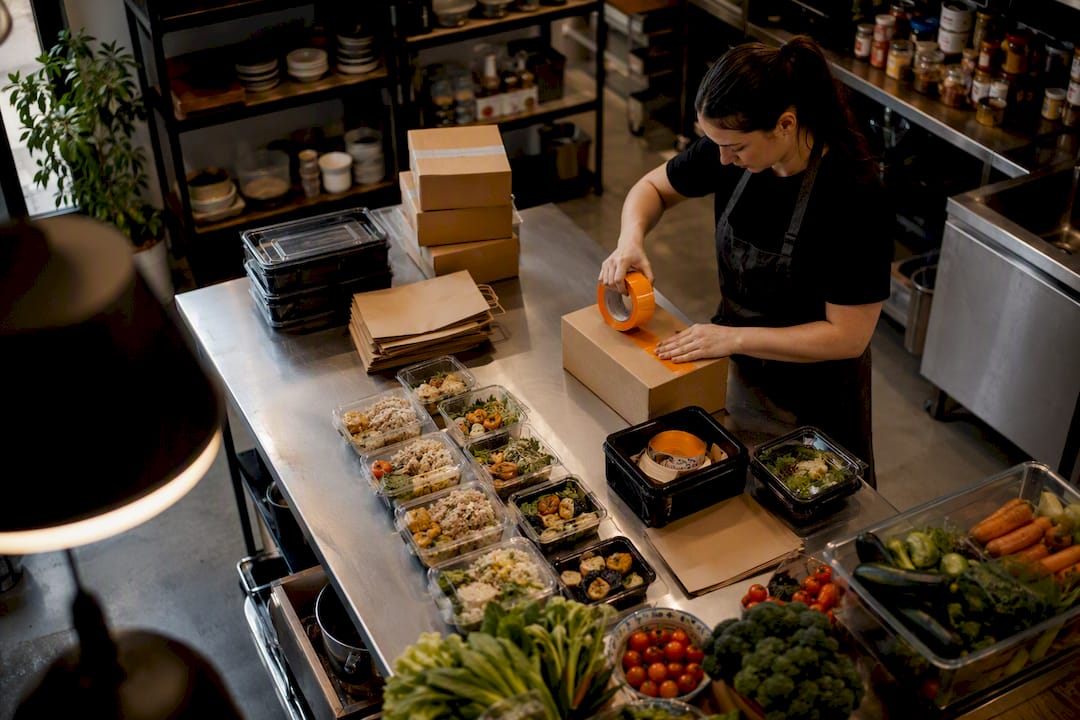
Show the cutoff time directly on your ordering page, not buried in an FAQ. A countdown or a plain "orders close at 2:00 PM for tomorrow's pickup" line at checkout does more to prevent late orders than any polite reminder text sent after the fact.
Confirmation messages matter almost as much as the cutoff itself. Every order should trigger an automatic confirmation with the pickup window and any preparation the customer needs to do (bring a cooler bag, arrive within a 15-minute window, use a side entrance). This is also where meal pickup reminders earn their keep: a message sent a few hours before pickup, not just at order time, cuts down on no-shows dramatically.
For recurring customers, the messaging needs a slightly different tone. A weekly subscriber doesn't need the full cutoff explanation every time, they need a short heads-up that this week's order is locking in soon, with an easy link to skip or adjust if their plans changed. Burying that option makes people cancel the whole subscription instead of pausing it for one week.
Keep your tone consistent across every touchpoint, whether it's a text, an email, or an in-app notification. Customers who get a formal email and a casual text from the same business start to wonder if they're dealing with a real system or improvised messaging, and that doubt shows up as more "is this still happening?" follow-ups in your inbox.
Matching Your Staffing and Prep Plan to the Schedule
Your pickup schedule is really a staffing document in disguise. Every slot you open is a promise that someone will be prepping, packing, and handing off orders during that window, and your schedule should reflect the staff you actually have, not the staff you wish you had.
Start by mapping your busiest slots against your current shift patterns. If your 5 to 6 p.m. window consistently fills first, that's the window that needs your most experienced prep staff, not whoever happens to be on the closing shift that day. This sounds obvious, but plenty of small food businesses schedule staff by day of week rather than by actual order volume within that day.
Recurring orders make this planning easier over time, since a stable base of weekly subscribers gives you a predictable prep floor you can staff against with confidence. The unpredictable part becomes the one-off orders layered on top, which is exactly why per-slot capacity caps matter. They keep spontaneous demand from overwhelming a shift that was staffed for your recurring baseline.
Build in a review rhythm, weekly at minimum, where you check actual order volume per slot against what you staffed for. If a slot consistently runs under capacity, you're overstaffed for it. If it consistently caps out with a waitlist, that's a signal to either raise the cap (if your kitchen can handle it) or open an additional slot nearby. Guides on streamlining meal prep operations cover this staffing-to-demand matching in more depth, but the core habit is simple: let the data from your schedule drive the staffing decision, not the other way around.
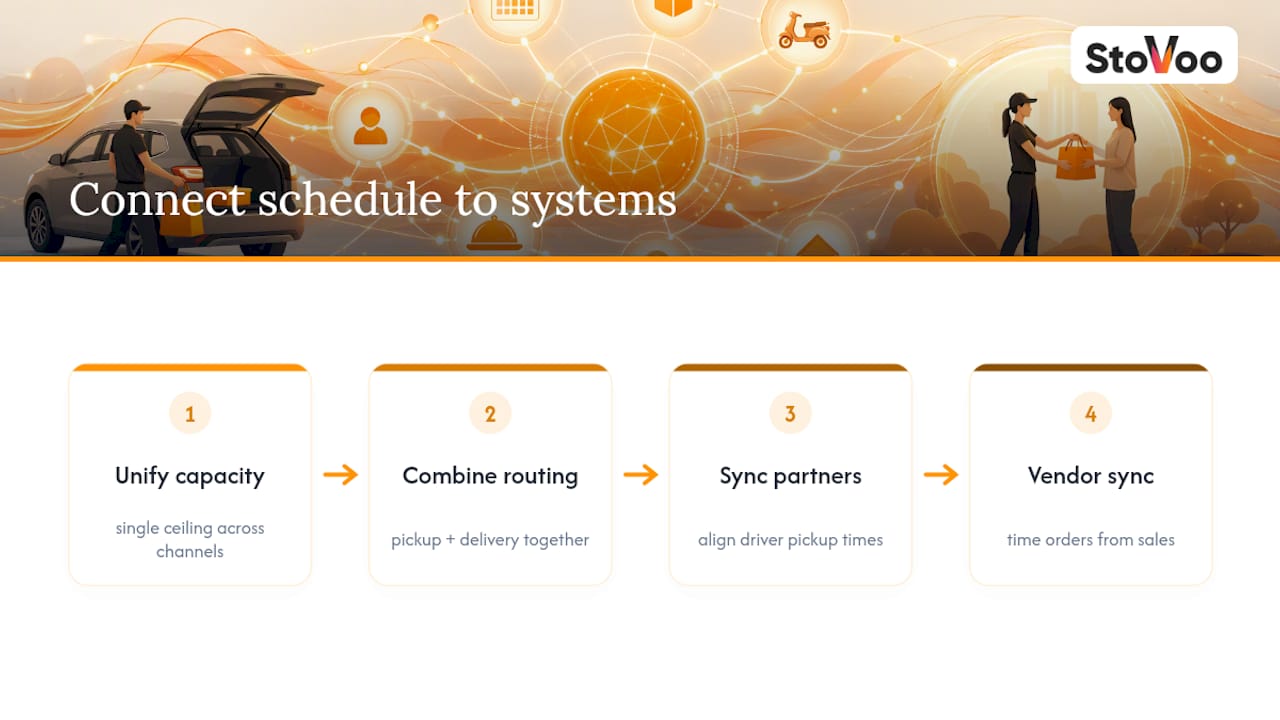
Connecting Your Schedule to Delivery and Vendor Systems
Most food businesses eventually run pickup and delivery side by side, and the two need to share the same underlying capacity logic or you'll oversell without realizing it. If your kitchen can handle 40 orders in the 5 p.m. window, that ceiling has to apply whether the order is a pickup or a delivery route, not two separate limits that quietly stack on top of each other.
Route optimization tools become relevant the moment you're running both. Combining pickup collection with delivery drop-off, particularly if you use reusable packaging, reduces planning time and driving distance when the two are scheduled together instead of managed as separate systems. That efficiency also tends to appeal to environmentally minded customers who like knowing their container is coming back for reuse rather than the trash.
If you work with third-party delivery partners, make sure their pickup windows sync with your kitchen's actual readiness times, not an estimate the delivery platform generated on its own; planning with plant-based menu ideas can help coordinate slot timing with product prep and packaging. A driver arriving before an order is ready creates a bottleneck at your counter; a driver arriving after it's ready means food sits out longer than it should. Neither is a good look, and both are avoidable with a shared calendar instead of two systems guessing at each other.
Vendor integrations matter here too, particularly for ingredient ordering. If your pickup volume spikes predictably on weekends, that same data should inform when you're placing orders with your own suppliers, closing the loop between what you're selling and what you're buying to make it.
Why Real-Time Slot Availability Matters More Than It Seems
A schedule that shows stale availability is worse than no schedule at all, because it actively misleads customers into thinking a slot is open when it's already full. That gap between what the page shows and what your kitchen can actually deliver is where most pickup complaints originate.
Real-time updates mean the moment a slot hits its capacity cap, it disappears or grays out for the next customer browsing your shopfront. No double-booking, no awkward phone call explaining that the 6 p.m. slot they thought they grabbed doesn't exist. This matters even more for recurring orders, since a subscriber's standing slot needs to reserve its spot automatically each cycle without a staff member manually blocking it off every week.
The technical side of this doesn't need to be complicated for a small operation, but it does need to be consistent. A shared, live dashboard that both your ordering page and your kitchen staff can see removes the lag between "a slot filled up" and "the page reflects that." Spreadsheets and manual updates almost always introduce that lag, even with a diligent team, simply because someone has to remember to update the sheet before the next customer loads the page.
Designing an Interface Customers Actually Want to Use
Customers deciding between pickup times will abandon the process if it takes more than a few taps to find an open slot. The interface needs to show available windows clearly, ideally with the earliest option highlighted, and make the cutoff time visible before checkout, not as a surprise after payment.
Mobile matters more than desktop for this audience. Most customers are booking a pickup slot from their phone while doing something else entirely, waiting for a kid's practice to end, standing in line somewhere. A shopfront that loads slowly or requires pinching and zooming to read the slot list loses orders it never even knew it had.
Simplicity beats customization here. A calendar view with too many filters and options creates hesitation. A short list of the next available slots, sorted by soonest, gets people through checkout faster and reduces the number who close the tab to "think about it." For recurring customers, the interface should also make it obvious how to skip or adjust an upcoming order without digging through account settings, since burying that option is one of the fastest ways to lose a subscriber entirely.
Handling Last-Minute Changes Without Losing Your Margin
Cancellations and last-minute swaps are inevitable, and the businesses that handle them cleanly are the ones with a policy set before the request comes in, not one improvised in the moment. Vague policies invite negotiation; specific ones don't.
Set a clear cancellation window tied to whether the order was prepaid. A prepaid order might allow a full refund up to 24 hours before pickup and a partial credit inside that window, while an unpaid order can be more flexible since you haven't collected payment yet. Automate this rule directly in your ordering system so a customer sees the deadline and the consequence before they click cancel, rather than after.
Last-minute swaps, changing a pickup time rather than canceling outright, deserve slightly more flexibility, especially for recurring customers who are otherwise reliable. But even flexibility needs a boundary: a same-day swap request an hour before pickup probably can't be honored if your kitchen already started that order. Say so plainly on the confirmation message, not just buried in a terms page nobody reads.
Using Pickup Data to Improve Your Schedule Over Time
A schedule you never review is just a guess that happened to work once. The businesses that get sharper over time are the ones pulling basic reports: which slots fill first, which run consistently under capacity, and how often cutoffs get hit right at the wire versus with room to spare.
Look at no-show rates by slot and by day of week. A pattern of no-shows clustered around a specific evening window often points to a cutoff or reminder timing problem, not a customer problem. Cross-reference that against your reminder timing, if reminders go out too early, people forget by pickup time; too late, and they've already made other plans.
Recurring order data deserves its own look. Track skip and pause rates over a few months, since a rising skip rate on a specific plan can be an early signal that the offering itself needs a refresh before customers cancel outright instead of pausing.
Keeping Customer and Order Data Secure
A scheduling system holds real customer data, names, phone numbers, payment details, pickup habits, and that data needs the same care you'd expect from any service handling personal information. Look for a platform that encrypts payment processing rather than storing card details in a plain spreadsheet or a shared inbox, which is a bigger risk than most small operators realize until something goes wrong.
Customer ownership matters here too, in a data sense as much as a business sense. If your scheduling tool is a feature bolted onto a third-party marketplace, you may not fully control your own customer list, which becomes a real problem if that platform changes its terms or you want to switch tools later. A system where you own the customer relationship directly keeps that data, and the ability to reach your own customers, in your hands.
Why Treating Scheduling as an Operational Promise Changes Everything
The conventional advice on pickup scheduling treats it like a UX problem: pick a nice calendar widget, add some colors, done. That framing misses the point entirely. A pickup slot is a promise you're making to prep, pack, and hand off a specific order at a specific time, and every setting you configure is really a statement about what your kitchen can honestly deliver.
Most failures in this space aren't caused by bad software. They're caused by operators setting cutoffs and capacity caps based on optimism rather than an honest look at their own prep line. A 15-minute cutoff sounds professional right up until the third rush order of the day makes it a lie.
What the evidence actually supports is starting generous and tightening over time, not the reverse. Wide slots, longer cutoffs, and lower per-slot caps feel conservative at launch, but they're what let a schedule survive contact with a real Saturday. Tighten only once you've watched a few weeks of actual data, not gut instinct.
If there's one place to focus first, it's automating the cutoff enforcement itself. Everything else, capacity caps, recurring orders, reminders, matters less if your ordering page still lets someone squeeze in an order five minutes after it should have closed.
— freeman
Get Your Pickup Schedule Running on Stovoo
Stovoo handles the exact mechanics this article walks through: enforced cutoffs that close automatically, per-slot capacity caps tied to what your kitchen can actually handle, and recurring order management with skip, swap, and pause built in for subscribers. You keep the customer relationship, too, since Stovoo gives you a dashboard and a shopfront you control, not a marketplace listing where the platform owns the contact list.
If you're starting from scratch, the fastest path is setting up your shopfront, configuring one product with a realistic cutoff, and opening a single test slot before you add recurring plans on top. Look at a live example like the shopfront setup for abc to see how a real vendor structures their pickup and catering offerings, or check out how ami in London presents recurring meal plans alongside one-off orders. When you're ready to build your own, create your account and start selling with a schedule built for how your kitchen actually runs, not a generic calendar bolted onto a checkout page.
Key Takeaways
Reliable meal pickup scheduling comes down to enforced cutoffs, capacity caps sized to real kitchen output, and recurring-order support built in from the start.
| Point | Details |
|---|---|
| Automate your cutoff | Show the deadline on your ordering page and let the system close orders automatically, no manual policing. |
| Start with generous slots | Use wide windows (15 to 20 minutes for quick items) and tighten only after weeks of stable data. |
| Cap capacity to real output | Set per-slot order limits based on what your kitchen can actually prep, not an optimistic guess. |
| Separate cutoff rules by complexity | Quick items need 15 to 45 minutes lead time; made-to-order or catering needs 24 to 72 hours or more. |
| Use Stovoo for the full picture | Stovoo combines cutoffs, capacity caps, recurring orders, and a customer-owned shopfront in one dashboard. |
Sources
- How to Accept Pre-Orders for Your Restaurant or Cafe (2026) | OrderViaChat
- How to Set Order Cutoff Times for Your Food Business
- Delivery Slots and Cut-Off Times on Shopify: A Setup Guide for Fresh Food Brands | StoreBuilt
- Meal delivery businesses (OptimoRoute)
FAQ
What Is a Reasonable Cutoff Time for Meal Pickup Orders?
Quick, ready-to-go items typically need 15 to 45 minutes lead time, while made-to-order meals or catering trays need 24 to 72 hours, and custom cakes often need even longer.
How Do I Set Capacity Limits for Pickup Slots?
Base your per-slot cap on your actual prep, packing, and oven or stovetop capacity during that window, not an estimate, and adjust it after a few weeks of real order data.
Should I Offer Recurring Pickup Orders From the Start?
Most operators do better starting with skip-the-line and same-day scheduled pickup, then adding recurring orders once those two models run smoothly.
Can Stovoo Handle Both One-Time and Recurring Pickup Orders?
Yes, Stovoo supports meal subscription plans alongside one-off catering and digital product orders in the same dashboard, with customer-facing skip, swap, and pause controls built in.
What Happens if a Customer Cancels After the Cutoff?
Set a clear policy in advance, typically a full or partial refund window for prepaid orders and more flexibility for unpaid ones, and automate the enforcement so the rule applies consistently every time.