
Inventory online, for a food creator, isn't stockroom software. It's your shopfront listings plus the real-time availability behind them: which meals are still open for Thursday, how many subscription slots are left, whether Saturday's catering calendar has room, and whether that recipe ebook is instantly downloadable. Get this right and orders match reality every time. Get it wrong and you're refunding an oversold dinner at 9 PM.
The action to take today: spend 10 minutes auditing your current listings and set availability rules for anything perishable or slot-based.
Run through this checklist right now:
- Does every meal listing show a cutoff time, not just a date?
- Can a customer accidentally book a catering slot you've already filled?
- Do subscription plans show remaining capacity, or just "available"?
- Does your digital recipe product deliver instantly after payment clears?
Pro Tip: If you can't answer all four questions in under two minutes per listing, your inventory online setup has a gap that will eventually cost you a refund or an angry customer message.
Key Takeaways
Accurate online inventory for a food business means treating every listing as a time-bound availability object with a clear cutoff, not a static product with infinite stock.
| Point | Details |
|---|---|
| Define inventory correctly | It's shopfront listings plus real-time availability for meals, slots, bookings, and downloads. |
| Match controls to item type | Perishables need cutoffs, subscriptions need capacity, catering needs calendars, digital needs instant links. |
| Automate the highest-friction flows first | Start with subscription billing and calendar sync before scaling further. |
| Track a small set of KPIs weekly | Watch availability rate, oversells, fill rate, and fulfillment lead time. |
| Use Stovoo for the full workflow | Stovoo centralizes availability rules, cutoffs, billing, and bookings in one dashboard. |
Table of Contents
- What Belongs in a Food Vendor's Online Inventory
- Why Managing Inventory Online Matters for Food Creators
- Step-by-Step: Implement Inventory Online on Your Shopfront
- Common Problems and How to Fix Them
- Metrics to Watch After You Launch Inventory Online
- Quick Launch Checklist (Pre-Launch Sanity Checks)
- Rachel the Retailer: A Short Case Study
- Security and Data Privacy Considerations for Online Inventory
- Connecting Inventory to Marketing and Customer Communication
- Organizing Your Inventory So Customers Can Actually Find It
- Keeping Availability Accurate in Real Time
- Common Mistakes I See Food Businesses Make
- How Stovoo Helps You Manage Inventory Online
- Sources
- FAQ
What Belongs in a Food Vendor's Online Inventory
Four item types make up nearly every food business shopfront, and each one needs a different kind of availability control.
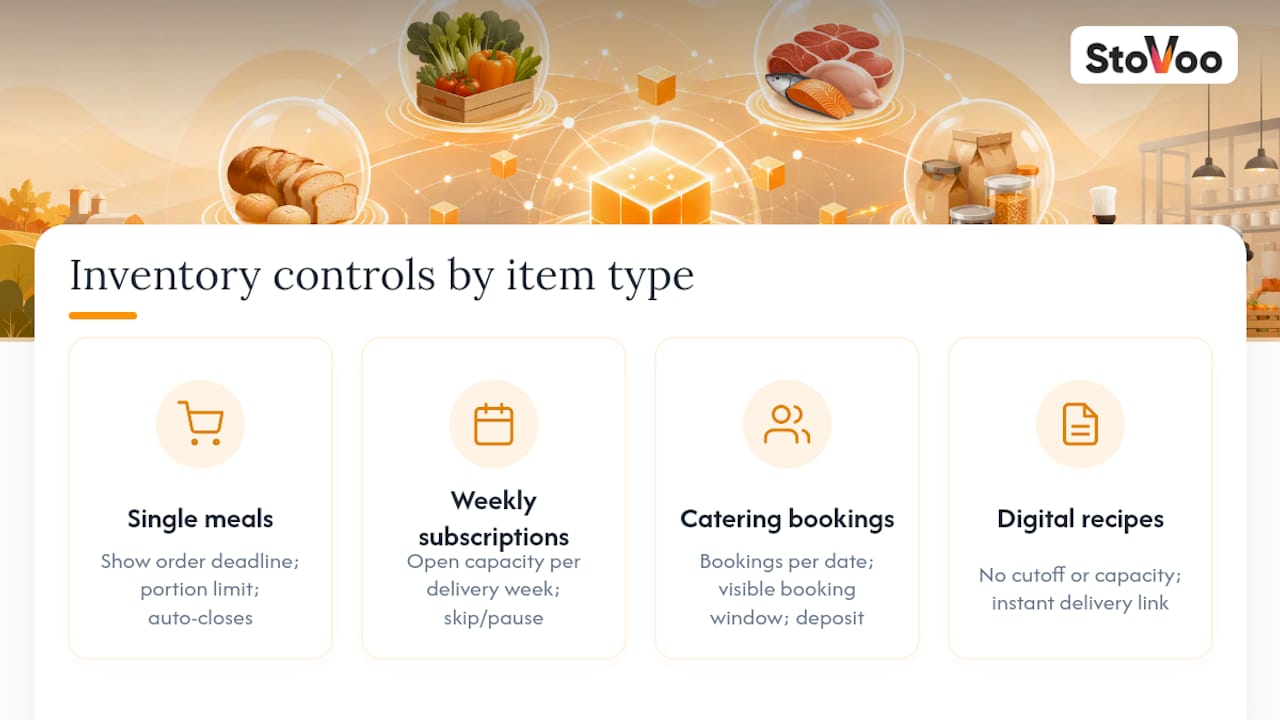
Single meals and daily menus need a hard cutoff time and a portion count. Once the count hits zero or the clock passes cutoff, the listing has to close automatically, not manually.
Weekly subscription slots run on a recurring calendar. Availability here means open capacity per delivery week, plus skip and pause logic so a subscriber who skips this week doesn't get billed or counted against your pack plan.
Catering bookings and event slots work more like a calendar than a shelf. Capacity is measured in bookings per date, and the listing needs a visible booking window (how far out someone can book, and by when a deposit locks the date).

Digital recipe products or courses are the simplest case: no cutoff, no capacity, just an instant delivery link after checkout.
The UX decision that matters most across all four: show the deadline, not just the product. A customer should never have to guess whether "Thursday's box" means order-by-Thursday or delivered-Thursday.
Why Managing Inventory Online Matters for Food Creators
Accurate availability isn't a nice-to-have polish item. It's the difference between a business that runs itself and one where you're personally fielding "did my order go through?" messages every night.
When listings match real capacity, you get:
- Fewer oversells and the refund conversations that follow them
- Fewer double bookings on catering dates
- Lower customer support load, because the shopfront answers questions before they're asked
- Higher conversion, since customers trust availability they can see is current
- A better shot at selling out premium slots, because scarcity that's real (not glitchy) drives urgency
Meal-kit and subscription food businesses in particular run on weekly cycles with strict cutoff windows, which makes subscription-first billing and accurate weekly recurrence essential to forecasting how much to buy and prep, according to a breakdown of meal delivery app architecture. For small retailers generally, industry guidance on ecommerce inventory points to automated systems as the better fit once you're selling across more than one channel or using outside fulfillment, since manual tracking starts breaking down at exactly that point.
Step-by-Step: Implement Inventory Online on Your Shopfront
You don't need a six-month rollout. You need a focused sequence, and most of it fits into your first week.
1. Day 1: Run the audit. Check every listing for a title, a slug or SKU-style identifier, an availability window, portion size, pickup or delivery days, cutoff time, and a stated cancellation policy. Flag anything missing.
2. Week 1: Set availability rules by type. Perishable meals get cutoff rules. Subscriptions get slot capacities. Catering gets a booking calendar. Digital products get instant links with no capacity limit at all.
3. Connect your integrations. Sync a calendar or booking widget for catering, turn on billing automation for subscriptions, and make sure catering leads have a single, clear order owner rather than landing in three inboxes at once.
4. Test five realistic flows before you go live. A single meal order, a subscription sign-up and skip, a catering booking, a recipe download purchase, and an order placed right after cutoff. This five-flow test matrix catches most launch-day breakages before a customer finds them for you, based on implementation guidance from meal-kit software builds.
5. Assign roles. Decide who updates listings when something sells out, who handles exceptions like a customer ordering after cutoff, and have a saved message template ready for "sold out" situations so nobody's improvising at 11 PM.
Prioritize in this order: automate subscription billing first (it's your recurring revenue), then calendar sync for catering, then cutoff rules for perishables, and add digital delivery last, since it needs the least maintenance.
Pro Tip: Compute your cutoff time per delivery zone or fulfillment method instead of using one blanket deadline. A customer three zones away from your kitchen needs an earlier cutoff than someone getting same-day pickup, and treating them the same is how oversells happen.
| Implementation Phase | What to Complete |
|---|---|
| Day 1 | Full listing audit across all four item types |
| Week 1 | Availability rules, capacity limits, cutoff windows set |
| Week 1 | Calendar sync, billing automation, order ownership confirmed |
| Before launch | Five-flow test completed and documented |
Common Problems and How to Fix Them
Most post-launch fires trace back to one of four causes, and each has a known fix.
Double bookings and oversells usually come from calendar drift or a missing capacity rule. Fix it by enabling hard capacity limits per slot and running two-way calendar sync so a booking made anywhere updates everywhere.
Sync lag across channels happens when you're relying on manual exports or delayed webhooks. Real-time webhooks and shorter cache refresh windows close that gap, with a single system owning the order record instead of three spreadsheets fighting for the truth.
Customer confusion about cutoffs is almost always a messaging problem, not a technical one. A live countdown, a reminder sent before cutoff, and a clear fallback option ("order now for next week instead") solve most of it.
Refunds and cancellations get expensive fast without clear terms. Automated prorated refunds and a stated cancellation window on the product page cut down the back-and-forth.
Pro Tip: Build automated fallback messaging for late orders instead of just blocking the button. "Cutoff passed, here's next week's slot" keeps a near-miss customer instead of losing them entirely.
Metrics to Watch After You Launch Inventory Online
Four numbers tell you almost everything: availability rate (percent of listings showing correct live status), oversell incidents per 1,000 orders, booking-fill rate for catering slots, and fulfillment lead time.
On the commercial side, track conversion rate on available items, cancellation and refund rate, and average order value split by item type, since meals, catering deposits, and digital downloads behave very differently.
A simple weekly spreadsheet works fine to start. Small food brands get real value from tracking just five KPIs consistently, according to research on inventory analytics for small food brands:
| Metric | How to Track It |
|---|---|
| Waste rate | Weekly log of unsold or expired product |
| Sell-through | Units sold vs. units listed per week |
| Days on hand | Average time inventory sits before use |
| Fill rate | Percent of orders fully fulfilled |
| Expiry risk | Items nearing cutoff with low sell-through |
Quick Launch Checklist (Pre-Launch Sanity Checks)
Before you announce anything publicly, run this list once:
- Test cutoff behavior with a fake order placed just after the deadline
- Confirm calendar sync and capacity limits reflect actual bookings
- Verify payment flows for both subscriptions and catering deposits
- Check that digital product delivery links actually fire post-purchase
- Preview every public listing on a phone, not just a desktop
- Run a soft launch using staff or friend accounts before going public
Give the soft launch 30 minutes. Place a few test orders across item types and watch for mismatched capacity, broken links, or a cutoff that doesn't trigger. If something's off, roll the listing back to draft immediately rather than leaving it live while you troubleshoot.
Rachel the Retailer: A Short Case Study
Rachel runs a weekly meal subscription plus occasional catering on the side. Before she fixed her setup, she was reconciling orders by hand in a spreadsheet, and peak weeks reliably produced oversells because nothing capped how many subscription slots she'd actually confirmed.
She audited her listings, added slot capacities with per-zone cutoffs, turned on automated billing for subscriptions, and built one clean product page template for catering deposits instead of quoting each client individually.
The oversells stopped almost immediately once capacity limits were tied to the calendar instead of Rachel's memory. Reconciliation, which used to eat an evening every week, dropped to a quick weekly check.
Small food operators who move from manual reconciliation to even lightweight automated tracking tend to see meaningful drops in time spent chasing errors, a pattern consistent with findings on inventory analytics for small food brands. Rachel's fix cost her an afternoon of setup, not a rebuild.
Security and Data Privacy Considerations for Online Inventory
Your shopfront holds more than menu listings. It holds customer payment details, delivery addresses, subscription histories, and sometimes dietary or allergy notes tied to real people. Treat that as sensitive data, because it is.
A SaaS shopfront should handle payment processing through a compliant processor rather than storing card details yourself. That's not just good practice, it's what keeps you out of PCI compliance territory you don't want to manage as a solo food business.
Customer ownership matters here too. If your booking and billing data lives inside one platform rather than scattered across a messaging app, a spreadsheet, and a payment link, you have one place to audit access, one place to update a privacy policy, and one place to pull records if a customer asks what data you hold on them.
Watch for a few practical risks: shared logins across staff (use individual accounts with role limits instead), export files sitting in unsecured cloud folders, and third-party calendar or booking widgets that don't clearly state where they store data. Before connecting any integration, check whether it's encrypting data in transit and who has access to your customer list beyond you.
None of this requires a compliance department. It requires picking a platform built for food commerce rather than duct-taping together tools that were never designed to hold payment and health-adjacent data side by side.
Connecting Inventory to Marketing and Customer Communication
Your availability data is marketing material, not just backend logic. A subscription slot showing "3 left this week" does more to drive a sign-up than any promotional email, but only if your marketing tools can actually see that number.
The practical move is connecting your listing status to whatever you use for customer communication, whether that's email, SMS, or a messaging app broadcast.
The same logic applies to cutoff reminders. A message sent two hours before a subscription cutoff, reminding someone to confirm or skip their box, does double duty: it reduces support questions and it's a natural touchpoint to mention a new catering package or recipe drop. For guidance on structuring these subscriber touchpoints without turning into spam, see this breakdown of meal-prep customer management strategies.
Keep the loop tight: inventory status feeds your messaging, and messaging drives the orders that update your inventory. Platforms that separate these into different tools force you to update both manually, and that gap is where stale "still available" messages get sent about something that sold out an hour earlier.
Organizing Your Inventory So Customers Can Actually Find It
Categorization sounds like a back-office chore, but it's really a navigation problem for your customers. A shopfront with 30 items dumped into one list forces a customer to scroll past catering packages to find a single meal, and that friction costs conversions.
Group by the four core types first: meals, subscriptions, catering, and digital products. Within meals, sub-group by dietary category or cuisine if you carry more than a handful of options. Within catering, separate by event size or package tier rather than listing every menu as a flat option.
Name listings the way a customer thinks, not the way your kitchen does. "Wednesday Family Box" beats "SKU-204-WedFam" every time; internal codes belong in your own notes, not on the public page.
Keep active and sold-out items visually distinct instead of just removing sold-out items entirely. A customer who sees "sold out, join waitlist" is more likely to come back next week than one who assumes you've closed the storefront. For a broader view of how ecommerce structure affects food sales, the guide on online ordering's role in food business operations covers how channel structure shapes customer behavior.
Keeping Availability Accurate in Real Time
Stale availability is worse than no availability at all, because it actively tells a customer something false. The fix isn't more manual checking, it's designing the system so updates happen automatically at the moment something changes.
For perishable meals, tie the listing status directly to your order count, not a manual toggle you remember to flip. Once orders hit your portion cap, the listing should close itself. For subscriptions, skip and pause actions from customers need to update your pack-plan numbers immediately, since a skip you don't register shows up as a phantom order come production day.
Catering calendars need two-way sync. If you block a date on your personal calendar because you're traveling, that block has to reflect on the public booking page within minutes, not after your next login.
The businesses that struggle here are almost always relying on a manual export or a nightly sync job. A same-day webhook based update, where a change on one end fires an update everywhere else, closes that lag. For meal-kit style operations specifically, computed per-zone cutoffs and pack-plan delta feeds are the systems worth prioritizing first precisely because they're the pieces most likely to drift out of sync without dedicated logic behind them.
Common Mistakes I See Food Businesses Make
The biggest one: treating listings like static product pages instead of time-bound availability objects. A meal isn't a product with infinite stock, it's a promise with a deadline, and your listing needs to say so.
The second: waiting to automate until you've "scaled enough to justify it." Automate the highest-friction flows first, subscriptions and calendar sync, while you're still small enough that the fix is easy.
The third: writing listings in your own operational shorthand instead of plain, customer-facing language with exact dates and times.
How Stovoo Helps You Manage Inventory Online
Everything covered above, the cutoff rules, the subscription capacity, the catering calendar, the instant digital delivery, is exactly what Stovoo's dashboard is built to run, without you needing a developer to wire it together yourself.
A vendor selling weekly meal plans can set a computed cutoff by delivery zone, watch a countdown display automatically on the shopfront, and let the pack-plan number update itself every time a subscriber skips a week. Catering leads land with clear order ownership instead of scattering across text messages and email. Subscription billing runs on autopilot instead of you chasing payments manually.
You can see this in practice on live vendor shopfronts already running on the platform, from meal plan sellers to catering operators. If you're ready to stop patching together spreadsheets and messaging apps, create your vendor account and set up your first listing today.
Sources
- Meal Kit Software That Survives the Wednesday Cutoff
- How to Build a Meal Delivery App Like HelloFresh (2026)
- Inventory Analytics for Small Food Brands
- Ecommerce inventory management tips for small online retailers
FAQ
What Does "Inventory Online" Mean for a Food Business?
It refers to your shopfront listings and their real-time availability, covering meals, subscription slots, catering bookings, and digital recipe products, rather than physical warehouse stock.
How Often Should I Update Availability Rules?
Cutoffs and capacity limits should update automatically with every order, but review the rules themselves monthly as your delivery zones or catering volume change.
What's the Fastest Way to Fix Oversells?
Enable hard capacity limits tied directly to your order count and set up two-way calendar sync so bookings can't be double-confirmed across channels.
Can Stovoo Handle Both Subscriptions and Catering Bookings?
Yes, Stovoo's dashboard manages meal subscription slots, catering bookings, and digital recipe sales together under one set of availability rules and automated billing.
What Metrics Matter Most in the First Month?
Watch availability rate, oversell incidents per 1,000 orders, booking-fill rate, and fulfillment lead time, since these reveal setup problems fastest.