
TL;DR:
- Online catering success relies on capturing accurate data upfront, confirming bookings early with deposits, and backward-scheduling production with buffers. Using a centralized dashboard like Stovoo ensures all teams read from the same record, reducing errors and coordination failures. Automation of confirmations, headcount updates, and invoicing helps operators deliver consistent, profitable catering services.
You can run repeatable, low-error online catering from inquiry to invoice using a single dashboard and four rules: capture the right data upfront, confirm early with a deposit, backward-schedule production from service time, and build deliberate slack into every timeline. Most catering failures trace back to one of these four gaps, not to cooking quality. The catering industry generates hundreds of billions in annual revenue, and operators who systematize these four rules consistently outperform those who rely on memory and group chats.
Start this week with these four actions:
- Add required fields to your online order form: event date/time, guest count (plus 10% buffer), dietary restrictions, and delivery access details (dock, parking, entry codes)
- Set a deposit rule: require a deposit upfront for any booking above your minimum order threshold
- Schedule a 7-day headcount confirmation for every event and tie it to your production worksheet
- Build a reusable day-of checklist that includes a driver manifest, QC sign-off, and photo verification before load
Stovoo's centralized dashboard is built to hold all of this in one place, so your kitchen, sales, and logistics teams are always reading from the same record.
Table of Contents
- What fields does your online catering order form need?
- How do you confirm bookings and collect deposits reliably?
- How do you turn a confirmed order into a production plan?
- What does a solid prep and quality control process look like?
- What goes into a driver manifest and day-of handoff?
- How should you structure tiered catering menus for online orders?
- How do deposits, invoicing, and payment reconciliation work?
- What integrations should your order management system have?
- How do you choose and implement an online ordering system for catering?
- What causes the most common catering order failures?
- How does a centralized dashboard prevent coordination failures?
- How do you handle modifications and cancellations after booking?
- How do you manage peak demand without dropping quality?
- How do you train staff for online order workflows?
- What legal and compliance requirements apply to catering operations?
- How do you collect feedback and follow up after events?
- Key Takeaways
- Why systems beat cooking talent for consistent catering results
- Stovoo gives catering managers one place to run it all
- FAQ
What fields does your online catering order form need?
Getting the right data at intake is the single highest-leverage move in catering operations. A form that misses delivery access or skips dietary fields creates problems that no amount of kitchen talent can fix on event day.

Every catering order needs five categories of information: accurate headcount with a 10% buffer, dietary needs, realistic budget, distinct timing fields (food ready-by vs. service start), and delivery access details. Collect all five before confirming any booking.
| Field | Type | Required? | Validation Rule |
|---|---|---|---|
| Event date | Date picker | Yes | Must be 5+ days from submission |
| Food ready-by time | Time picker | Yes | Must precede service start |
| Service start time | Time picker | Yes | Required |
| Guest count | Integer | Yes | Min 10, triggers buffer calc |
| Delivery address | Text + zip | Yes | ZIP pattern match |
| Loading dock / access | Text | Yes | Free text |
| Entry codes / parking | Text | Yes | Free text |
| Dietary restrictions | Checkbox + text | Yes | Multi-select + open field |
| Service style | Dropdown | Yes | Drop-off / Staffed / Plated |
| Budget per person | Currency | Optional | Numeric |
| Billing contact | Email + phone | Yes | Email format validation |
Sequence the form so date and guest count appear first. This lets you disqualify unavailable dates before the client invests time selecting a menu. Put dietary fields before menu selection, not after, because the menu options should reflect what the group actually needs.
Pro Tip: Make dietary restriction fields required, not optional. Use quick checkboxes for the most common needs (vegan, gluten-free, nut allergy, dairy-free, halal, kosher) plus one open text field for specifics. A blank dietary field is a liability on event day.
How do you confirm bookings and collect deposits reliably?
Confirmation is where bookings either get locked or quietly fall apart. The goal is a complete confirmation sequence that removes ambiguity for both the client and your team.
A strong confirmation workflow runs on five automated touchpoints:
- Immediate receipt: On-screen confirmation plus an email with the full order summary, deposit amount, payment link, and change cutoff date, sent within one minute of submission
- Deposit receipt: Triggered automatically when payment clears; includes the remaining balance and final payment deadline
- 7-day headcount confirmation: A reminder that asks the client to confirm or adjust guest count; automatically updates the kitchen production worksheet when the response arrives
- 48-hour logistics check: Confirms delivery window, access details, and on-site contact name
- Same-day arrival notice: Sent when the driver departs, with an estimated arrival time
A deposit is standard practice for securing catering bookings. It protects your purchasing commitments and signals serious intent from the client. For corporate accounts, an invoice-on-account option with net-30 terms is reasonable, but still require a signed order confirmation before production begins.
Automate every touchpoint you can. The teams that recover revenue fastest are the ones that never rely on a staff member remembering to send a follow-up. Automation handles the sequence; your team handles the exceptions.
How do you turn a confirmed order into a production plan?
Backward scheduling is the method that separates organized catering operations from chaotic ones. Start at service time and work backward through every stage.

A typical backward schedule for a 12:00 PM service looks like this: load vehicle by 10:30 AM, final cook and plating complete by 10:00 AM, bulk prep complete by 8:00 AM, purchase order placed two days prior. Build a 45-minute buffer into the transport and final-cook stages to absorb stacked delays without cascading into the service window.
Lock final headcount 48–168 hours before the event, depending on size. A 50-person lunch can absorb a 24-hour change; a 300-person gala needs a 7-day lock. Record the change-cutoff date in the order record so every team member sees it without asking.
Convert confirmed headcount into purchase orders and pull sheets by assigning a named owner to each task. "Kitchen" is not an owner. "Maria, prep lead" is. Handoff ambiguity is the most common source of missed items, and naming owners in the record eliminates the "I thought someone else handled it" failure mode. For a deeper look at catering operations planning, the Stovoo blog covers scaling strategies in detail.
What does a solid prep and quality control process look like?
Consistency across orders comes from written standards, not from hoping the same cook is always on shift. Recipe scaling, portioning rules, and a QC checklist are the three tools that make it repeatable.
When scaling recipes for groups, round quantities to match your pack sizes. If your supplier sells chicken in 5-pound bags, scale to the nearest 5 pounds and log the adjustment in the event record. This prevents both waste and mid-prep shortages.
QC checklist for production and packout:
- Temperature check: hot items above 140°F, cold items below 40°F (per FDA Food Code standards)
- Dietary labeling: every container marked V (vegan), GF (gluten-free), DF (dairy-free) as applicable
- Pack count: physical count against the order manifest before sealing
- Photo verification: photograph the full packout before loading the vehicle
Packaging standards vary by service style. Drop-off orders need sealed, stackable containers with reheating instructions. Staffed service requires chafing dishes and serving utensils. Plated events need individual portion control and presentation consistency. Label every container with the event ID, item name, and dietary codes.
Pro Tip: Assign a single prep lead who owns final QC sign-off and photographs the complete order before it leaves the kitchen. One person accountable beats a shared assumption every time.
What goes into a driver manifest and day-of handoff?
Missing logistical documentation — loading-dock access, entry codes, visitor parking — is the top cause of late deliveries, not cook time. Fix it at the manifest level.
| Manifest Field | Example Value |
|---|---|
| Order ID | EVT-2026-#### |
| Client contact (on-site) | Jamie Torres, [phone number] |
| Delivery address | [street number] Commerce Blvd, Suite 3 |
| Parking / dock details | Dock B, south entrance, access code |
| Load order | Cold items first, hot items last |
| Labeling key | V=Vegan, GF=Gluten-Free, DF=Dairy-Free |
| Special handling | Cake tier: do not stack |
| Arrival window | 11:00–11:30 |
Limit booking slots to a manageable number per hour and group deliveries geographically to cut drive time. A driver covering three stops in the same zip code beats one covering three stops across town. Build a 20-minute transportation buffer into every route.
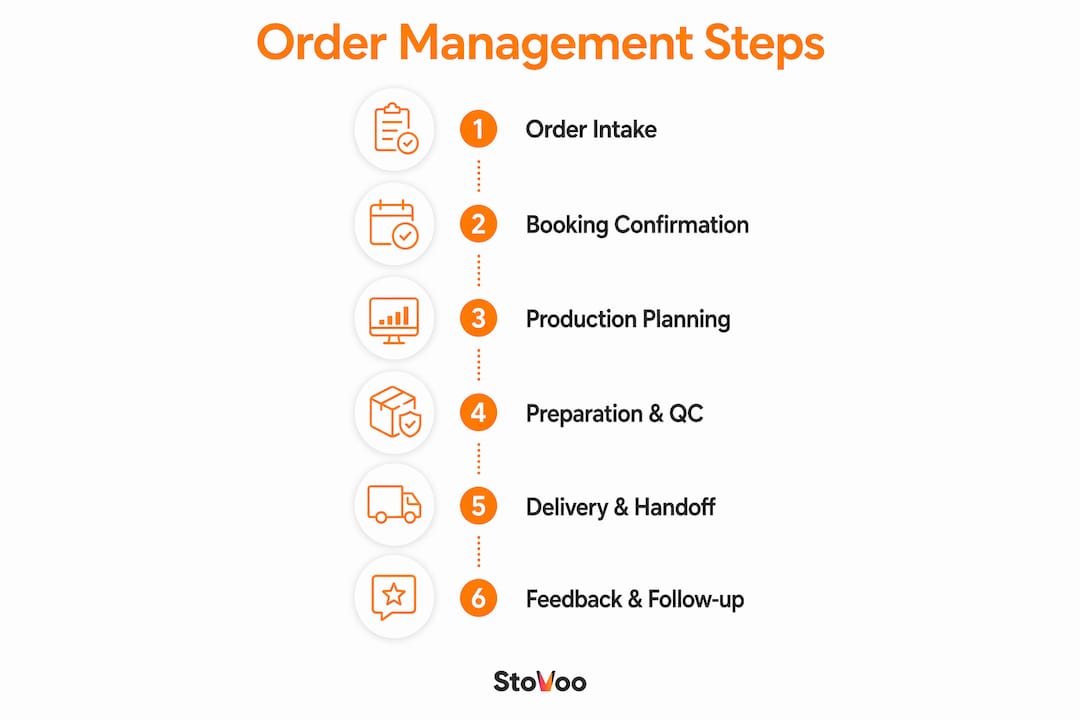
The day-of handoff checklist: confirm arrival window with on-site contact 30 minutes out, photograph delivered items on-site, count against the manifest, and collect a signature or timestamped photo confirmation. Record any exceptions (missing items, temperature issues, access problems) in the same event record so kitchen, sales, and billing all see the outcome without a separate email chain. The step-by-step catering process guide on the Stovoo blog walks through the full workflow end to end.
How should you structure tiered catering menus for online orders?
Tiered packages with fixed per-person pricing reduce decision fatigue and increase conversions. A Bronze/Silver/Gold structure gives clients a clear starting point while limiting the customization surface area your kitchen has to manage.
A practical tier structure:
- Bronze: Two proteins, two sides, bread, non-alcoholic beverages. Fixed per-person price, minimum 20 guests.
- Silver: Three proteins, three sides, salad, dessert, beverages. Fixed per-person price, minimum 15 guests.
- Gold: Four proteins, four sides, two salads, dessert station, staffed service, beverages. Fixed per-person price, minimum 25 guests.
Each tier allows limited customization: one protein swap, one extra side, and beverage add-ons. Keep the swap list short and pre-priced so the checkout total updates in real time. For menu planning ideas that translate well to online packages, the Stovoo blog has practical examples.
Transparent pricing at selection time increases conversion and cuts quote follow-up calls. Show the math: package price per person × guest count + delivery fee + staffing charge = total. Clients who see the full number before they commit are less likely to dispute it after.
Pro Tip: Build one vegan and one gluten-free option into every tier's default as a baseline for every 10 guests. This prevents last-minute substitution requests and makes your menu more inclusive without adding operational complexity.
How do deposits, invoicing, and payment reconciliation work?
The checkout flow should match the client type. For immediate bookings, a one-page checkout with a 25–50% deposit collected at submission works well. Corporate clients often need an invoice-on-account option with a signed order confirmation as the trigger for production.
Show price math during selection: package × guests + delivery + staffing = total. Make the deposit percentage explicit in the flow, not buried in the terms. Hiding pricing or forcing a quote request before showing numbers increases friction and reduces conversions.
Post-event billing should be automatic, not manual. Generate the balance invoice the morning after the event, set a 7-day payment deadline, and trigger a follow-up reminder on day 5 if the balance is unpaid. Every day you wait to invoice is a day the client's memory of the event fades.
For corporate accounts, support ACH transfers alongside credit cards. Large orders often exceed card limits, and offering ACH removes a friction point that can delay payment by weeks. Your order management system should write a clear audit trail: deposit received, balance invoiced, payment cleared, with timestamps on each.
What integrations should your order management system have?
A centralized order management system is only as good as the integrations that keep it current. The goal is a single event record that every team reads, so information never degrades across handoffs.
Priority integrations to insist on:
- POS sync: Menu items and prices stay consistent between your point-of-sale and your online catering form
- Calendar blocking: Confirmed events automatically block production capacity and delivery slots
- Accounting export: Orders write to QuickBooks or NetSuite automatically; no manual re-entry
- CRM contact sync: Client records update with every order, building a history you can use for follow-ups
- Delivery/dispatch routing: Driver manifests generate from the order record with no copy-paste
Automation workflows that cut errors most reliably: immediate inquiry acknowledgement (within 60 seconds), auto-generated proposal with a payment link, 7-day headcount reminder that updates production worksheets, and post-event invoice issuance. The role of automation in catering is worth understanding before you evaluate any platform.
The single-event-record principle matters because information degrades at every handoff. When kitchen, sales, and logistics each maintain their own version of an order, discrepancies accumulate. One shared record with named task owners stops that decay.
Pro Tip: Test the headcount-change workflow before you commit to any platform. Change a guest count in the system and watch whether the production worksheet, shopping list, and staffing plan update automatically. If they don't, that platform will create manual work at the worst possible moment.
How do you choose and implement an online ordering system for catering?
Selection criteria that actually matter for catering: native catering features (lead-time rules, package pricing, deposit workflows), integration depth with your POS and accounting software, mobile checkout for clients, and support for both direct checkout and invoice-on-account.
A phased implementation timeline that works without downtime:
- Week 1 (Discovery): Audit current order fields, map existing integrations, and define your deposit and change-cutoff policies
- Weeks 2–3 (Configuration): Migrate menu packages, configure deposit rules, and set up automated confirmation sequences
- Week 4 (Pilot): Run two or three recurring orders through the new system with staff in parallel mode
- Weeks 5–6 (Cutover): Go live on all new orders; keep the old system available for 30 days as a fallback
Budget for a one-time setup fee, a monthly subscription, and per-transaction fees. Get these numbers in writing before signing. Change management is often the hardest part: assign one internal project owner, run the two-week pilot on orders your team already knows well, and document a rollback plan in case of a critical workflow mismatch.
Pro Tip: Run your pilot on recurring orders, not one-off events. Recurring orders expose integration gaps faster because the same workflow repeats on a predictable schedule, making errors easy to spot and fix before they affect a high-stakes event.
What causes the most common catering order failures?
Most recurring failures follow a short list of patterns: missing delivery access details, late headcount changes with no production update, no deposit leading to last-minute cancellations, and fragmented communication across texts and emails.
When an order fails, work through this sequence:
- Reconstruct the order timeline from the first inquiry to the failure point
- Identify the last accurate source of truth (the confirmed order record, not a text message)
- Correct the event record and assign a named owner to each corrective action
- Lock every action to a specific person and deadline before closing the incident
For day-of failures, the playbook is: escalate to the on-site lead immediately, deploy buffer meals or substitutions from your standing inventory, document shortages with photos, and send a corrective plan to the client within two hours. Internally, notify kitchen, sales, and billing in the same message so no one is operating on stale information. Log the incident in the event record for vendor scorecards.
How does a centralized dashboard prevent coordination failures?
The before/after contrast is stark. Before a centralized system: a client emails a headcount change, the sales rep updates a spreadsheet, the kitchen never sees it, and 40 extra portions go unproduced. After: the client updates guest count through the portal, the production worksheet adjusts automatically, and the shopping list updates before anyone has to ask.
Stovoo's centralized dashboard addresses exactly this failure mode. Every event lives in one record: inquiry, confirmation, deposit, production notes, driver manifest, and invoice. When a headcount changes, the downstream documents update. Automated confirmations go out on schedule without a staff member remembering to send them.
The most successful catering programs have the best workflows, not necessarily the best cooks. A centralized record that every team member reads is the single highest-leverage operational change a catering manager can make.
For managers ready to test this, a practical starting point: import three recent orders into Stovoo, enable headcount reminders, and run a simulated headcount change. Watch whether the production worksheet, shopping list, and staffing plan update together. That test tells you more about the system's real value than any feature list.
How do you handle modifications and cancellations after booking?
Set a written change-cutoff policy and put it in every confirmation email. A practical standard: menu changes accepted up to 7 days before the event, headcount changes accepted up to 48 hours before, and cancellations within 72 hours forfeit the deposit.
When a modification arrives, update the event record first, then notify kitchen and logistics in the same action. Never update a spreadsheet and send a separate email; that split creates the exact information decay that causes failures. For cancellations, trigger the deposit-forfeiture rule automatically and send a written confirmation to the client. Document the cancellation reason in the record for pattern analysis.
How do you manage peak demand without dropping quality?
Peak periods (holiday seasons, graduation weekends, corporate Q4 events) require capacity planning that starts months out, not weeks. The key lever is booking-slot limits: cap the number of events per day based on your verified production capacity, not your optimistic estimate.
Build a recurring-order program for corporate clients who order weekly. Recurring orders are predictable, which means you can pre-purchase ingredients, pre-assign staff, and pre-build production schedules. That predictability is what creates the capacity headroom to handle peak one-off events without quality loss. For event catering coordination at scale, having a clear system for slot management is what separates operators who grow from those who plateau.
How do you train staff for online order workflows?
Role clarity is the foundation. Every person in the workflow needs a written job description for online orders specifically, not just their general kitchen or service role.
Assign four named roles for every online catering order: an order intake owner (reviews new submissions, flags missing fields, sends deposit requests), a production lead (owns the backward schedule, pull sheets, and QC sign-off), a logistics coordinator (builds driver manifests, confirms delivery access, tracks handoffs), and a billing owner (reconciles deposits, issues post-event invoices, follows up on balances). Cross-train at least one backup for each role. Run a tabletop drill quarterly: walk through a simulated order from intake to invoice and identify where the workflow breaks. For staff catering logistics, clear role assignments are what make the difference between a smooth event and a scramble.
What legal and compliance requirements apply to catering operations?
Food safety compliance in the United States is governed primarily by the FDA Food Code, which sets temperature, labeling, and handling standards that apply to catering operations. Most states adopt the FDA Food Code with minor modifications; check your state health department for the specific version in effect.
Catering businesses typically need a food handler's permit, a food establishment license, and in many jurisdictions a separate catering permit for off-site service. Alcohol service at catered events requires a separate license in every state. If you operate a commissary kitchen, that facility needs its own inspection and approval. Document every permit in your operations record and set calendar reminders for renewal dates. This article is general information, not legal or regulatory advice; confirm current requirements with your state health department or a licensed food safety consultant.
How do you collect feedback and follow up after events?
Send a post-event survey within 24 hours while the experience is fresh. Keep it to three questions: overall satisfaction, food quality, and one open field for comments. A short survey gets completed; a long one gets ignored.
Use the feedback data to build a vendor scorecard: track on-time delivery rate, order accuracy rate, and client satisfaction score per event. Review the scorecard monthly and use it to identify which parts of the workflow need attention. Follow up personally with clients who report a problem; a direct call within 48 hours recovers more relationships than any discount offer. Log all feedback in the client's CRM record so the sales team has context for the next booking conversation.
Key Takeaways
Running a consistent online catering operation requires a single source of truth, four operational rules, and automation that handles the sequence so your team handles the exceptions.
| Point | Details |
|---|---|
| Capture the right data upfront | Require event date, guest count with buffer, dietary needs, and delivery access on every order form. |
| Confirm early with a deposit | Collect a deposit at booking and automate a 7-day headcount confirmation tied to production worksheets. |
| Backward-schedule with a buffer | Start at service time, work backward through every stage, and build a 45-minute buffer into transport and final cook. |
| Single source of truth | Keep every order in one shared record so kitchen, logistics, and billing never work from different versions. |
| Stovoo centralizes the workflow | Stovoo's dashboard manages event records, automated confirmations, headcount reminders, and billing in one place. |
Why systems beat cooking talent for consistent catering results
The most persistent myth in catering is that quality problems are kitchen problems. In practice, the failures that cost operators money and clients are almost always coordination failures: the headcount change that never reached the kitchen, the driver who couldn't find the loading dock, the deposit that was never collected so the client canceled the morning of the event.
The single-source-of-truth principle is not a technology argument. It's an argument about where information lives and who owns it. When every team member reads from the same event record, the number of "I didn't know" moments drops to near zero. That's not a system selling itself; that's what happens when you remove the conditions that produce errors.
The operators who build repeatable, profitable catering programs are not always the most talented cooks in their market. They're the ones who test one process improvement per week, measure the outcome, and keep what works. Start with the intake form. Then the deposit rule. Then the backward schedule. Each one is a week's work. After six weeks, you have a system.
Stovoo gives catering managers one place to run it all
Scattered spreadsheets and WhatsApp threads are where catering revenue goes to disappear. Stovoo replaces that chaos with a centralized dashboard built specifically for food businesses: one place for event records, automated confirmations, headcount reminders, deposit collection, and post-event invoicing.
For catering managers who want to implement the workflows in this guide without building custom software, Stovoo handles the operational infrastructure. Mandatory field enforcement, tiered package pricing, deposit workflows, driver manifests, and accounting exports are all built in. The mobile-first shopfront means clients can book and pay from any device, and every transaction writes to the same event record your kitchen and logistics teams read. Set up your catering shopfront on Stovoo and run a two-week pilot on your recurring orders to see the workflow in action. Most operators have their first automated confirmation sequence running within a day of setup.
FAQ
What fields are required on an online catering order form?
At minimum: event date, food ready-by time, service start time, guest count, delivery address with access details, dietary restrictions, and billing contact. Missing delivery access details are the top cause of late deliveries.
What deposit percentage should catering businesses require?
A deposit of 25–50% is standard practice for securing catering bookings. Collect it at the time of booking confirmation, before any production begins.
How far in advance should you lock final headcount?
Lock headcount 48–168 hours before the event depending on size. Smaller events (under 50 guests) can accommodate a 48-hour lock; larger events need 7 days to allow purchasing and staffing adjustments.
How does Stovoo help manage online catering orders?
Stovoo provides a centralized dashboard where catering managers can handle event records, automated confirmations, headcount reminders, deposit collection, and post-event invoicing in one place, replacing scattered spreadsheets and messaging apps.
What is backward scheduling in catering production?
Backward scheduling means starting at the confirmed service time and working backward through every production stage to set deadlines for loading, final cook, bulk prep, and purchasing. Building a 45-minute buffer into transport and final-cook stages prevents cascading delays on event day.