

TL;DR:
- A repeatable catering invoicing workflow involves collecting deposits at booking, locking final headcounts, and automating reminders to expedite payments. This process relies on detailed invoices with itemized charges, PO numbers, and timely issuance within 24 hours after events to prevent delays. Automation tools like Stovoo streamline data capture, invoicing, and payment collection, reducing outstanding days from over 30 to under 10.
A repeatable catering invoicing workflow collects a deposit at booking, locks final headcount before the event, issues a final invoice immediately after with the deposit applied, delivers a Pay Now link, and triggers automated reminders until the balance clears. That sequence, done consistently, is what separates caterers who chase payments for weeks from those who reconcile much faster.
Here is the core checklist to run on every event:
- Deposit collected (a significant portion at booking, per industry practice)
- PO number captured for all corporate accounts at booking
- Headcount guarantee confirmed 7–14 days before the event
- Itemized final invoice issued within 24 hours of event completion, with deposit applied as prior payment
- Pay Now link embedded in the invoice email
- Automated reminder schedule set at Day 7, Day 14, and Day 30 post-invoice
- AR aging reviewed weekly; escalate any invoice past Day 30
Statistic callout: Automating invoice creation with a Pay Now link and auto-reminders can shrink AR cycles significantly, reducing the days outstanding from 30+ days to just 7–10 days in real-world examples.
For corporate accounts on net-30 terms, the same workflow applies. The only difference is that the balance due date shifts to 30 days from invoice date rather than day-of or T–7.
Table of Contents
- What makes catering invoicing different from a restaurant receipt?
- What every catering invoice must include
- How does the step-by-step invoicing workflow run?
- What are the most common catering invoicing mistakes?
- A practical invoice template you can adapt right now
- How should you collect payment and handle U.S. tax considerations?
- How can you automate your catering invoicing at scale?
- Key Takeaways
- The part most caterers skip until it costs them
- Stovoo turns this workflow into a daily reality
- Useful sources
- FAQ
What makes catering invoicing different from a restaurant receipt?
A restaurant receipt closes a single transaction at the table. A catering invoice covers an entire event lifecycle that can span weeks, involve multiple billing stages, and include line items that have nothing to do with food.
The scope is fundamentally different. A catering invoice must account for guaranteed minimums (the minimum guest count a client commits to pay for regardless of actual attendance), headcount adjustments when the final count changes, equipment rentals, staffing hours, venue fees, travel charges, and setup or breakdown labor. Each of those categories may carry a different tax treatment under U.S. state law, which is why separating them on the invoice matters.

Timing adds another layer of complexity. A restaurant receipt is issued once. A catering billing process typically generates at least two documents: a deposit invoice at booking and a final invoice after the event. Corporate clients often require a third document, a formal purchase order acknowledgment, before their accounts payable team will even process payment. Missing a PO number on a corporate invoice is one of the most common reasons AP departments reject catering invoices outright.
The full catering operations sequence runs from inquiry through post-event reconciliation. Invoicing sits at the end of that chain, but the data it needs (headcount, add-ons, PO numbers, staffing hours) must be captured all the way through.
What every catering invoice must include
Strong event catering invoices pass two filters: the client's own review and, for corporate accounts, an AP department's validation checklist. Here is the complete field list.
Mandatory header fields:
- Business name, logo, address, phone, email, and website
- Client billing name, company (if applicable), billing address, phone, and email
- Unique sequential invoice number (e.g., INV-2026-0047)
- Invoice issue date and payment due date
- Event name, event date, and event location
- PO number and cost-center code (corporate accounts only)
Body line items:
- Per-person menu lines with the guaranteed minimum guest count and the actual count, showing overage math (e.g., Buffet Dinner — 80 guaranteed min × $45/person = $3,600; actual 92 guests, overage 12 × $45 = $540)
- Staffing hours by role (servers, bartenders, event captain) with hourly rate
- Equipment rentals (chafing dishes, linens, tableware) itemized separately
- Travel, delivery, and setup/breakdown fees
- Service charge (labeled clearly as a service charge, not gratuity, since the two have different tax and labor implications in most U.S. states)
Footer fields:
- Subtotals by category (food/beverage, labor, rentals, fees)
- Sales tax applied only to taxable categories per your state's rules; separate food/beverage totals from labor and rental totals since labor and rentals are often non-taxable
- Deposit shown as a prior payment line, not a discount
- Balance due (bold, prominent)
- Accepted payment methods and remittance instructions
- Late fee policy (e.g., 1.5% per month on balances past due)
Pro Tip: Put the PO number and cost-center code on the first page, in the header, not buried in the notes field. AP teams scan the top of the document first. If those fields are missing or hard to find, the invoice goes into a review queue that can add 2–3 weeks to your payment cycle.
Stripe's invoice best practices also recommend making the word "Invoice" prominent in the header and including a clear invoice ID and due date to reduce processing friction on the client side.
How does the step-by-step invoicing workflow run?
The workflow has seven ordered stages. Each one feeds data into the next, so skipping a step usually means chasing information later under pressure.
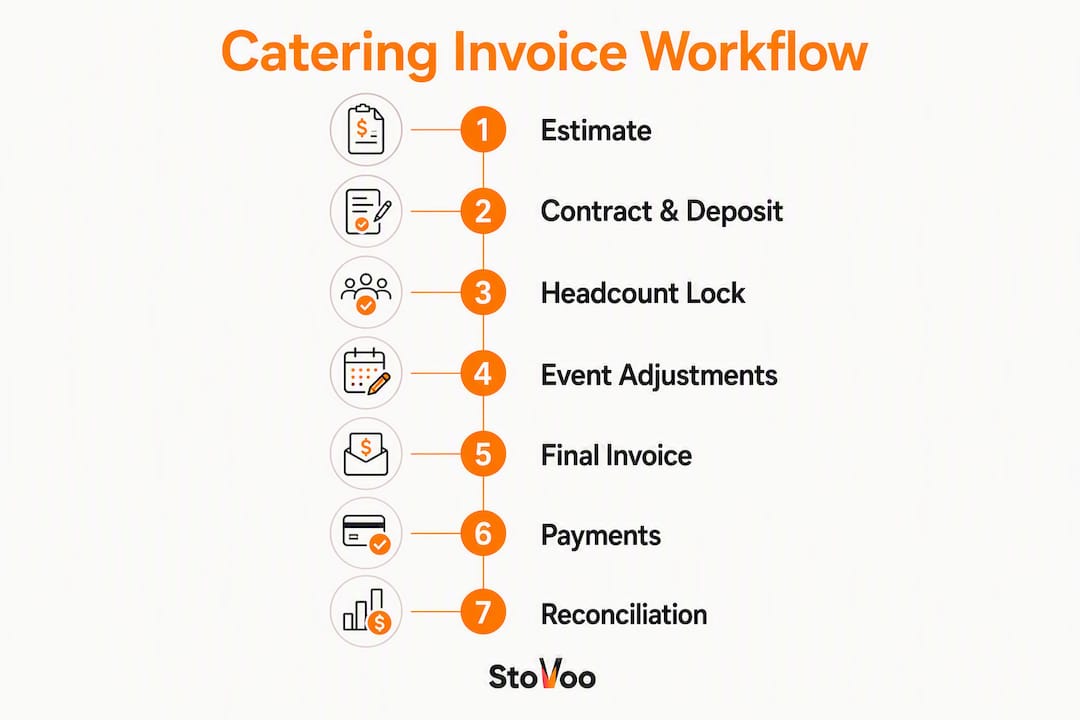
Stage 1 — Estimate and quote. Send a detailed written estimate with per-person pricing, guaranteed minimum, and a line-item breakdown. This document becomes the basis for the contract and the final invoice.
Stage 2 — Contract and deposit invoice. Once the client signs, issue a deposit invoice immediately. Industry guidance recommends collecting a significant portion of the estimated total. No deposit, no confirmed date. Collect the PO number here for corporate accounts.
Stage 3 — Headcount lock and confirmations. Set a contractual headcount lock date typically one to two weeks before the event. Send confirmation requests accordingly. Collecting the balance well before delivery reduces day-of payment failures significantly for larger orders.

Stage 4 — Event-day adjustments. Assign one team member to capture actuals: final guest count, any add-on orders, extra staffing hours, and equipment used. A simple notes field in your booking system works; the goal is a clean handoff to whoever builds the final invoice.
Stage 5 — Final invoice issued. Issue the final invoice promptly after event completion. Apply the deposit as a prior payment line. Attach a short post-event summary (headcount served, menu delivered, staffing hours) to reduce disputes before they start.
Stage 6 — Payment collection and reminders. Send the invoice with an embedded Pay Now link. Trigger automated reminders at Day 7, Day 14, and Day 30 if the balance remains open.
Stage 7 — Reconciliation and AR aging. Mark invoices paid when funds clear. Review your AR aging report routinely. Escalate any significantly overdue invoices to direct contact or formal notices.
Who does what
| Stage | Sales / Booking | Operations | Accounting |
|---|---|---|---|
| Estimate and quote | Builds and sends estimate | Confirms capacity and staffing | Reviews pricing margins |
| Contract and deposit | Collects signed contract and PO | — | Issues deposit invoice, collects payment |
| Headcount lock | Sends lock reminder to client | Confirms staffing and supplies | Updates estimated invoice total |
| Event-day adjustments | — | Captures actuals (count, add-ons, hours) | — |
| Final invoice | — | Delivers actuals to accounting | Issues final invoice within 24 hours |
| Payment and reminders | — | — | Sends Pay Now link, runs reminder schedule |
| Reconciliation | — | — | Marks paid, updates AR aging |
For managing catering bookings efficiently, the handoff between operations and accounting at Stage 5 is the most failure-prone step. A shared notes field or a brief post-event form keeps it clean.
What are the most common catering invoicing mistakes?
Most payment delays trace back to a handful of fixable errors. Here are the ones that show up most often, and exactly what to do about each.
Bundling all charges into a single line. A line that reads "Catering Services — $8,500" gives a corporate AP reviewer nothing to validate against the PO. Break every charge into its own line by category. BILL's invoice processing guidance confirms that invoices failing PO verification at capture get routed for manual review, which adds days or weeks to the cycle.
Missing or wrong PO number. The fix is structural: add a mandatory PO field to your booking intake form. If a corporate client cannot provide a PO at booking, do not confirm the date. Collect it before the deposit invoice goes out.
No headcount lock deadline in the contract. Without a written lock date, clients adjust guest counts the day before the event, which breaks your staffing plan and your invoice math. Put the lock date in the contract and reference it in every confirmation email.
Issuing the final invoice days or weeks after the event. The longer you wait, the colder the client's memory of the event and the harder it is to collect. Issue within 24 hours, while the event is fresh.
Showing the deposit as a discount instead of a prior payment. A discount changes the taxable subtotal. A prior payment line preserves the full invoice value and shows the client exactly what they already paid. Use the correct label.
No late fee language. If your invoice does not state a late fee, you have no contractual basis to charge one. Add a line: "Balances unpaid after [due date] accrue a 1.5% monthly service charge."
Pro Tip: Attach a one-page post-event summary to every final invoice. List the actual headcount, the menu served, and the staffing hours logged. Clients who receive this rarely dispute the total, and corporate AP teams process it faster because the summary matches their internal event records.
For a broader look at operational controls that protect profit, the same discipline that prevents invoicing errors also prevents margin leakage across the whole operation.
A practical invoice template you can adapt right now
The sample below covers a private event with per-person pricing and an overage charge. Adapt the fields to your own business.
INVOICE Freeman's Catering Co. | 123 Main St, Chicago, IL 60601 | (312) 555-0100 | hello@freemanscatering.com
Invoice #: INV-2026-0047 Issue Date: June 14, 2026 Due Date: June 21, 2026 Event: Johnson Wedding Reception | June 13, 2026 | The Grand Ballroom, Chicago, IL
Bill To: Sarah Johnson | 456 Oak Ave, Chicago, IL 60602 | sarah@email.com
| Description | Qty | Unit Price | Amount |
|---|---|---|---|
| Overage — actual 112 guests (12 × $65) | 12 | — | — |
| Bar Service — 5 hours | 5 hrs | — | — |
| Event Staff — 4 servers × 6 hours | 24 hrs | — | — |
| Linen and Tableware Rental | 1 | — | — |
| Setup and Breakdown | 1 | — | — |
Payment accepted via ACH, credit card (Pay Now link below), or check payable to Freeman's Catering Co. Balances unpaid after June 21, 2026 accrue a 1.5% monthly service charge.
For corporate accounts, the structure shifts slightly. Add the PO number and cost-center code to the header, replace the single event block with per-event detail lines if you are consolidating a month of orders, and note the net-30 due date explicitly.
Keep a downloadable PDF version of your template ready to attach alongside the final invoice. When you send the final invoice, attach both the PDF and the post-event summary in the same email.
How should you collect payment and handle U.S. tax considerations?
The payment method you offer shapes how fast you get paid. Card payments clear in 1–2 business days but carry processing fees, typically 2.5–3.5% for card-present and slightly higher for card-not-present transactions. ACH transfers are cheaper (often under $1 per transaction) but take 2–3 business days to settle. Zelle works well for smaller private events where the client is an individual. Checks remain common for large corporate orders where the AP department cuts a check on a fixed schedule.
The practical answer for most catering businesses: embed multiple payment rails in a single Pay Now link so the client picks the method that works for them. Fewer friction points mean faster payment.
Recommended deposit and balance schedule
| Order type | Deposit | Balance due |
|---|---|---|
| Private event under typical deposit threshold | 25% at booking | Day-of or T–7 |
| Private event $2,000–$10,000 | 50% at booking | T–7 to T–14 |
| Private event over $10,000 | 50% at booking | T–14 |
| Corporate (net terms) | 25–50% at booking | Net-30 from final invoice |
| Recurring corporate account | First-month deposit | Monthly consolidated invoice |
For balance collection timing, charging the balance 48 hours to 14 days before delivery reduces day-of payment failures, particularly for larger orders.
U.S. tax reminder: Sales tax rules for catering vary by state and sometimes by county. In most U.S. states, food and beverage charges are taxable while labor and equipment rental charges are not, but the rules differ. Service charges may be taxable if they are distributed to employees as wages in some states. Always confirm the applicable rate and taxable categories with your state's department of revenue or a qualified tax professional for your specific situation. Never apply a single flat rate across all line items without verifying the scope.
Failure handling:
- Card declined on auto-charge: retry once after 24 hours, then send a manual payment request with an alternate payment link
- Day-of no-show or partial payment: hold the event summary and final invoice until a payment commitment is confirmed in writing
- Corporate invoice past Day 30: escalate to a direct call to the AP contact, then send a formal overdue notice referencing the contract's late fee clause
For more on online payment setup for food businesses, the same principles apply whether you are running a single event or a recurring corporate account.
How can you automate your catering invoicing at scale?
Manual invoicing works when you are running two or three events a month. Past that, the gaps between completed work and collected payment start costing real money. Automation closes those gaps without adding headcount.
Here is the automation checklist that covers the full cycle:
- Template library: maintain separate templates for private events and corporate accounts; auto-select at booking based on client type
- One-click invoice from booking: generate the final invoice directly from the completed work order so no data gets re-entered manually
- Embedded Pay Now link: every invoice email includes a single link that exposes card, ACH, and Zelle options
- Automated reminders: Day 7, Day 14, and Day 30 triggers fire without manual intervention
- AR aging dashboard: real-time view of every open invoice, sorted by days outstanding
- Monthly consolidation: recurring corporate accounts receive one invoice per month with per-event detail lines
The integration flow looks like this: booking confirmed → PO and payment method captured → deposit invoice auto-generated → event completed → actuals entered → final invoice auto-generated with deposit applied → Pay Now link delivered → webhook marks invoice paid when funds clear → AR aging updates automatically.
Stovoo's automation capabilities cover the full cycle from booking to payment, which means you are not stitching together three separate tools to get there. For a phased rollout, start with deposit automation and Pay Now links in week one, add automated reminders in week two, and build out the AR aging dashboard in week three once your template library is set.
For mixed B2C and B2B operations, maintain two standard templates and automate the selection at booking. That single step eliminates most manual switching errors and the AP rejections that follow.
Key Takeaways
A well-run catering invoicing workflow collects a deposit at booking, locks headcount before the event, issues a final itemized invoice within 24 hours, and uses automated reminders to close the AR cycle in 7–14 days.
| Point | Details |
|---|---|
| Deposit at booking | Collect an upfront deposit; no deposit, no confirmed date. |
| Itemized line items | Separate food/beverage, labor, and rentals for tax accuracy and AP approval. |
| Final invoice timing | Issue within 24 hours of the event with the deposit shown as a prior payment. |
| Automate reminders | Set Day 7, Day 14, and Day 30 triggers to close AR cycles in 7–14 days. |
| Stovoo for automation | Stovoo's centralized dashboard handles booking, deposit collection, automated billing, and Pay Now links in one place. |
The part most caterers skip until it costs them
The invoicing advice that circulates in most catering communities focuses on what to put on an invoice. That is the easy part. The harder part, and the one that actually determines whether you get paid on time, is the data capture that happens before the invoice is ever created.
Most late payments and disputed invoices trace back to one of three gaps: a PO number that was never collected at booking, a headcount that was never formally locked, or event-day actuals that were never written down. By the time the invoice goes out, the information is either missing or contested. No amount of automation fixes a data gap.
The workflow in this guide is built around closing those gaps upstream. The deposit policy enforces commitment at booking. The headcount lock deadline forces a written confirmation before the event. The post-event summary captures actuals while the event is still fresh. Those three controls do more for your AR cycle than any reminder sequence.
Automation then multiplies the value of clean data. When the booking record is complete, a one-click invoice takes seconds. When the invoice includes a Pay Now link, clients pay the same day. When reminders fire automatically, you stop spending mental energy tracking who owes what. The catering operations improvements that move the needle are almost always upstream process fixes, not downstream collection tactics.
Stovoo turns this workflow into a daily reality
Chasing invoices manually, re-entering booking data into a spreadsheet, and texting clients payment reminders are all symptoms of the same problem: a billing process built on disconnected tools. Stovoo replaces that with a single dashboard where bookings, deposits, invoicing, and payment collection all live together.
When a client books through your Stovoo shopfront, their details and payment method are captured immediately. Deposit invoices go out automatically. After the event, you generate the final invoice in one click, with the deposit already applied. The embedded Pay Now link gives clients a branded, mobile-first way to settle the balance. Automated reminders handle follow-up so you can focus on the next event instead of the last one.
Stovoo is built specifically for food businesses, which means the workflow fits catering operations without customization. Start your Stovoo account and have your first automated invoice out the door this week.
Useful sources
- Invoice Requirements: What To Include And Best Practices | Stripe — core invoice field checklist and header best practices
- What is invoice processing and how does it work? | BILL — invoice capture, PO verification, and approval workflow steps
- Step by Step Catering Process | Stovoo Blog — full operations workflow context for invoicing placement
FAQ
What should you put on a catering invoice?
A catering invoice needs your business info, client billing details, a unique invoice number, event date and location, itemized line items by category (food/beverage, labor, rentals, fees), the deposit shown as a prior payment, applicable sales tax, and clear payment terms with a due date.
How do you create an invoice for a catering event?
Start from a template that separates food/beverage, labor, and rental charges into distinct line items. Apply the deposit as a prior payment, add a Pay Now link, and issue the invoice within 24 hours of the event. For corporate clients, include the PO number and cost-center code in the header.
What are the steps in a catering invoice processing workflow?
The sequence runs: estimate and quote, contract and deposit invoice, headcount lock confirmation, event-day actuals capture, final invoice issued with deposit applied, payment collection with automated reminders, and AR reconciliation. BILL's invoice processing framework describes the same core stages: capture and validation, PO verification, approval, and payment.
How do you handle deposits on a catering invoice?
Show the deposit as a "Prior Payment" line item on the final invoice, referencing the original deposit invoice number and date. Never label it as a discount, since that changes the taxable subtotal. Industry guidance recommends collecting 25–50% at booking to secure the date.
Can Stovoo automate catering invoices and payment reminders?
Yes. Stovoo's centralized dashboard handles booking intake, automated deposit invoicing, one-click final invoice generation, embedded Pay Now links, and automated payment reminders, covering the full catering billing cycle from booking to reconciliation.